Reverse Engineering "VAMPIR MMORPG"
VAMPIR
i like mmorpgs. i played a lot of them and every time i play one i end up thinking about the technical side more than the game itself. vampir is the new one from netmarble, it came out recently, and the first thing i checked was not the gameplay, it was the binaries folder.
unreal engine 5.5.4, and the build machine's paths are still in there:
.rdata:000000014A434F58  text "UTF-16LE", 'Unreal Engine 5.5.4',0
.rdata:0000000149769680  text "UTF-16LE", 'E:\Work\UE5\Release-5.5\Engine\...'
this is the opposite problem from the last game i wrote about. mixmaster had no engine anybody knew, so every function had to be found by hand. here the layout is public and the hard part is working out which of the 176,300 objects in the process are worth touching.
what i wanted out of it was simple:
- boxes and names over actors
- skeletons drawn from real bone positions, not guessed
- change what my character is wearing
- change what my mount looks like
everything here is rendering state in my own process. no packets, no server calls. i am not going to show how the dll gets in either.
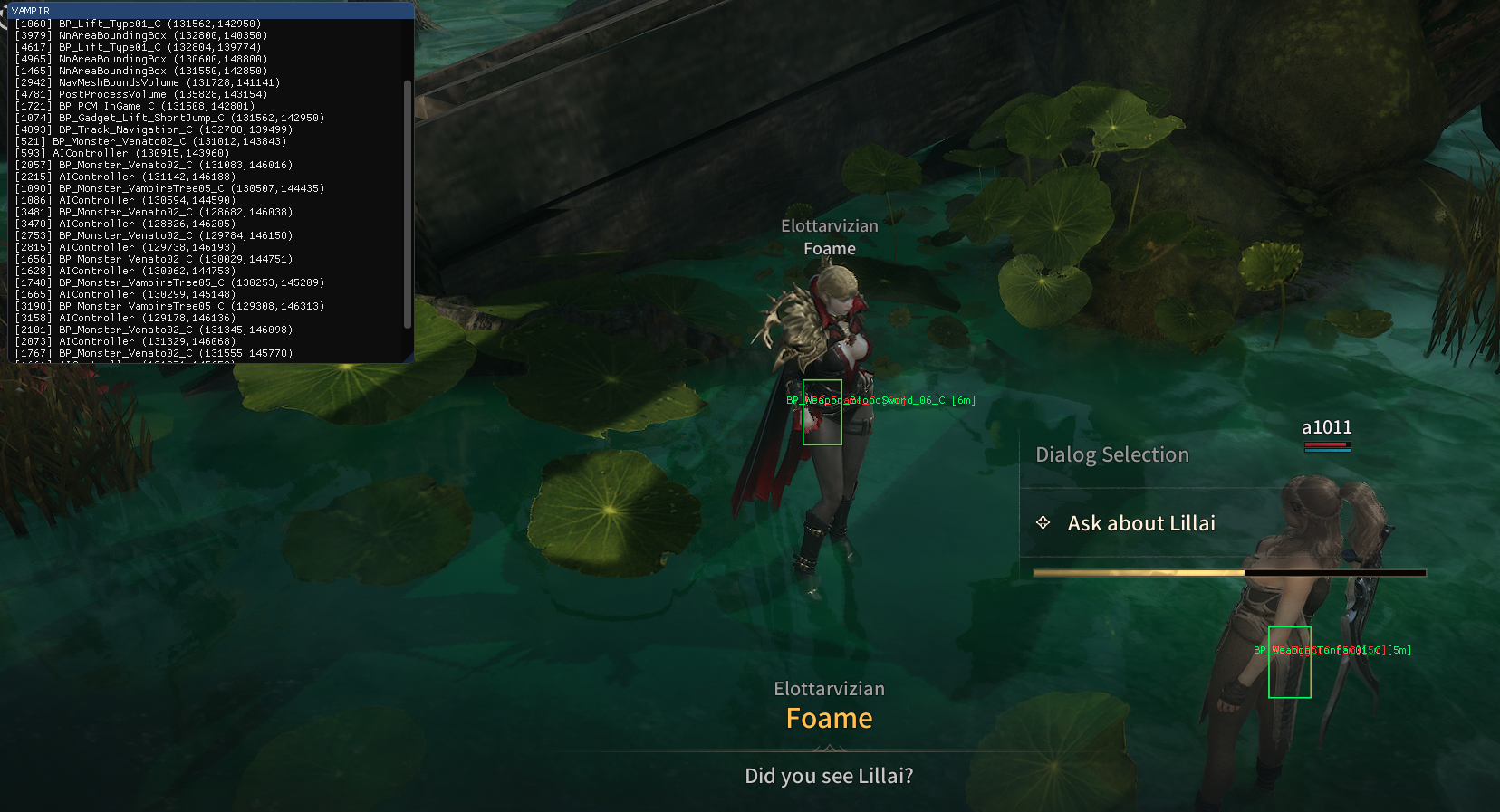 day one. actors enumerated and printed into a console window.
getting the offsets
Dumper-7 gave me 819 headers and this log:
Found FChunkedFixedUObjectArray GObjects at offset 0xb552530
Off::InSDK::ObjArray::FUObjectItemSize: 18
Found FName::AppendString at Offset 0x15B98A0
Found 'FNamePool GNames' (lazy-init) at offset 0xB46ED80
Off::UObject::Flags: 0x8
Off::UObject::Index: 0xC
Off::UObject::Class: 0x10
Off::UObject::Name: 0x18
Off::UFunction::FunctionFlags: 0xB0
Off::InSDK::ULevel::Actors: 0xA0
PE-Offset: 0x17E4E00
PE-Index: 0x4F
GWorld-Offset: 0xB6CFDB8
remember Off::UFunction::FunctionFlags: 0xB0 and PE-Offset: 0x17E4E00.
both come back later and one of them cost me a week.
the array walk, 0x10000 per chunk and 0x18 per item:
Object ObjectAt(int32_t index) {
  if (index < 0 || index >= ObjectCount()) return nullptr;
  constexpr int32_t kPerChunk = 64 * 1024;
  constexpr int32_t kItemSize = 0x18;

  auto** chunks = *reinterpret_cast<uint8_t***>(g_base + offsets::kGObjects);
  if (chunks == nullptr) return nullptr;
  uint8_t* chunk = chunks[index / kPerChunk];
  if (chunk == nullptr) return nullptr;

  return *reinterpret_cast<Object*>(chunk + static_cast<size_t>(index % kPerChunk) * kItemSize);
}
176,300 objects, 80,131 names. i wrote a dump button so i could grep the whole thing offline, which is how i found basically every asset name in this post.
names go through FName::AppendString at 0x15B98A0 rather than the pool,
so nothing breaks when the entry header layout moves again:
; FName::AppendString
015B98A0  mov     qword ptr [rsp+0x10], rbx
015B98A5  mov     qword ptr [rsp+0x18], rsi
015B98AA  push    rdi
015B98AB  sub     rsp, 0x20
015B98AF  cmp     byte ptr [rip+0x9EB5271], 0   ; pool initialised yet?
015B98B6  mov     rsi, rdx                      ; FString* out
015B98B9  mov     ebx, dword ptr [rcx]          ; ComparisonIndex
015B98BB  mov     rdi, rcx
it takes a stack buffer, so resolving a name costs no allocation.
the first thing that wasted my time here was stupid. i was comparing class
names against "Character" and matching nothing at all. turns out FName
keeps whatever spelling was registered first, and in this game it is
ACHARACTER, all caps. you can see it in the generated sdk if you actually
read it, which i did not.
the esp
the walk is GWorld down to actors. all of these offsets came out of the
generated headers, i did not find any of them in a disassembler:
UWorld              +0x030  PersistentLevel        ULevel*
                    +0x178  Levels                 TArray<ULevel*>
                    +0x1D8  OwningGameInstance     UGameInstance*
UGameInstance       +0x038  LocalPlayers           TArray<ULocalPlayer*>
UPlayer             +0x030  PlayerController       APlayerController*
ULevel              +0x0A0  Actors                 TArray<AActor*>
APlayerController   +0x350  AcknowledgedPawn       APawn*
                    +0x360  PlayerCameraManager    APlayerCameraManager*
APlayerCameraManager
                    +0x1410 CameraCachePrivate     FCameraCacheEntry
                      +0x10   POV                  FMinimalViewInfo
one thing that caught me: reading only PersistentLevel gives you about half
the actors. vampir streams zones in, so monsters live in Levels too. you
have to walk both:
template <typename Visitor>
void ForEachActor(Object world, Visitor&& visit) {
  if (!Live(world)) return;
  const Object persistent = Read<Object>(world, offsets::kWorldPersistentLevel);
  const auto levels = Read<Array<Object>>(world, offsets::kWorldLevels);
  const int32_t level_count = levels.Valid(4096) ? levels.count : 0;

  for (int32_t li = -1; li < level_count; ++li) {
    const Object level = li < 0 ? persistent : levels[li];
    if (!Live(level) || (li >= 0 && level == persistent)) continue;

    const auto actors = Read<Array<Object>>(level, offsets::kLevelActors);
    if (!actors.Valid(1 << 20)) continue;
    for (int32_t i = 0; i < actors.count; ++i) {
      const Object actor = actors[i];
      if (Live(actor)) visit(actor);
    }
  }
}
not crashing
a page validity check is useless here, freed slots get reused within a frame.
what holds up is asking GObjects whether the object still claims its index:
bool Live(Object object) {
  if (object == nullptr || !Ready()) return false;

  // A stale pointer usually fails here: the slot it claims either holds a
  // different object or is outside the array entirely.
  const int32_t index = Read<int32_t>(object, offsets::kObjectIndex);
  if (index < 0 || ObjectAt(index) != object) return false;
  if (Read<Object>(object, offsets::kObjectClass) == nullptr) return false;

  return (Read<uint32_t>(object, offsets::kObjectFlags) & offsets::kDeadObjectFlags) == 0;
}
if GObjects[object->InternalIndex] does not point back at you, it is
garbage. anything that still gets through hits an seh frame around the walk,
so a bad read costs one frame instead of the process.
boxes
i started with the capsule. ACHARACTER::CapsuleComponent at 0x338, radius
and half height at 0x50C and 0x508. it works but the box is a fixed
cylinder that does not care what the actor is doing, so a player on a mount
gets a human sized box around a wolf.
AActor::GetActorBounds is reflected and gives the real thing. the param
struct is in the sdk, and the padding is worth looking at:
// SDK/Engine_parameters.hpp Actor_GetActorBounds
struct GetActorBoundsParams {
  bool only_colliding = false;
  uint8_t pad0[7] = {};
  sdk::Vector origin;      // doubles, not floats
  sdk::Vector extent;
  bool include_children = true;
  uint8_t pad1[7] = {};
};
padding is the thing to watch. ue5 vectors are doubles, so both bools pad to 8. a ue4 struct copied in here writes a bool into the middle of a vector.
eight corners from origin and extent, twelve edges, project each one. the view basis gets built once per frame from the camera rotator so projecting a point is two dot products and a divide.
boxes, names and distance in a populated area. the skeletons in there come from the next section.
skeletons, and the function that returned zero
this is the part i actually wanted to write about.
the plan was normal. GetNumBones to get the count, GetBoneName(i) and
GetParentBone(name) once per mesh to build a parent table, then
GetBoneTransform(name, RTS_World) per bone per frame.
every single call returned zero.
[world] topology 0x1d0c0b78040: 0 bones
[world] topology 0x1d06a2f10f0: 0 bones
[world] topology 0x1d15e3b7090: 0 bones
GetNumBones takes no arguments. there is no failure path. the object was
alive, the UFunction resolved by name, the call came back without crashing
and the answer was zero.
my wrapper was the one everyone writes:
void Invoke(Object target, Object function, void* params) {
  using ProcessEventFn = void(__fastcall*)(void*, void*, void*);
  auto** vtable = *reinterpret_cast<void***>(target);
  auto call = reinterpret_cast<ProcessEventFn>(vtable[0x4F]);
  call(target, function, params);
}
i checked the param struct three times. it is one int32, the sdk says so. i
checked the vtable index, 0x4F, the dumper says so. i checked
USkinnedMeshComponent::SkeletalMesh at 0x520 in case i had the wrong
component. all fine.
so i gave up guessing and went to read ProcessEvent itself. the dumper told
me where it is, PE-Offset: 0x17E4E00.
what ProcessEvent does before anything else
; UObject::ProcessEvent(UFunction* rdx, void* r8)
017E4E39  test    rcx, rcx
017E4E3C  je      0x17E51CF                     ; this == null, bail
017E4E42  mov     eax, dword ptr [rcx+8]        ; UObject::ObjectFlags
017E4E45  shr     eax, 0x1E
017E4E48  not     al
017E4E4A  test    al, 1
017E4E4C  je      0x17E51CF                     ; unreachable, bail
017E4E52  xor     esi, esi
017E4E54  test    dword ptr [rdx+0xB0], 0x400   ; <-- here
017E4E5E  je      0x17E4E92
; native path
017E4E60  mov     rax, qword ptr [rcx]
017E4E66  call    qword ptr [rax+0x280]         ; GetFunctionCallspace
017E4E6C  mov     ebx, eax
017E4E6E  test    al, 1                         ; Remote
017E4E70  je      0x17E4E8D
017E4E86  call    qword ptr [r10+0x288]         ; CallRemoteFunction
017E4E8D  test    bl, 2                         ; Absorbed
017E4E90  jmp     0x17E4E95
; script path
017E4E92  cmp     dword ptr [rdx+0x68], esi     ; Script.ArrayNum == 0 ?
017E4E95  je      0x17E51CF                     ; <-- bail
017E4E9B  mov     rcx, qword ptr [rdi+0xC8]     ; into the interpreter
rdx is the UFunction, and +0xB0 is FunctionFlags, the offset the
dumper already printed. the other flag tests further down the function
confirm it is the right field:
| site | mask | EFunctionFlags |
|---|---|---|
017E4E54 |
0x400 |
Native |
017E4EB7 |
0x8000 |
UbergraphFunction |
017E500B |
0x400000 |
HasOutParms |
the native branch eventually lands in UFunction::Invoke at 0x16B73F0,
which is where the compiled c++ body actually gets called:
016B7463 ff 95 d8 00 00 00 call qword ptr [rbp+0xD8] ; UFunction::ExecFunction
Off::UFunction::ExecFunction: 0xD8, also straight from the dumper log. so
the native path reaches real code and the script path does not.
both jes at 0x17E4E4C and 0x17E4E95 land on 0x17E51CF, which is
nothing but the epilogue:
017E51CF  mov     rcx, qword ptr [rbp+0xC0]
017E51D6  xor     rcx, rbp
017E51D9  call    __security_check_cookie
017E51DE  mov     rbx, qword ptr [rbp+0x128]
017E51E5  lea     rsp, [rbp+0xD0]
017E51EC  pop     r15
...
017E51F6  pop     rbp
as pseudocode:
void __fastcall UObject::ProcessEvent(UObject *this, UFunction *Function, void *Parms)
{
  if ( !this )
    return;
  if ( (~(*(_DWORD *)(this + 8) >> 30) & 1) == 0 )    // IsUnreachable()
    return;

  if ( (*(_DWORD *)(Function + 0xB0) & 0x400) != 0 )  // FUNC_Native
  {
    callspace = (*(*this + 0x280))(this, Function, 0);
    if ( callspace & 1 )
      (*(*this + 0x288))(this, Function, Parms, 0, 0);
    if ( callspace & 2 )
      return;
  }
  else if ( *(_DWORD *)(Function + 0x68) == 0 )       // Script.Num() == 0
  {
    return;
  }
  // FFrame setup, locals, interpreter ...
}
+0x68 is the count of UStruct::Script, the blueprint bytecode array. you
can work that out from the offsets the dumper already gave us: SuperStruct
at 0x40, Children 0x48, ChildProperties 0x50, PropertiesSize
0x58, MinAlignment 0x5C, then the TArray at 0x60 with its count at
0x68.
so here is the whole bug. GetNumBones is a native c++ function exposed to
blueprint. it has no bytecode. if you call ProcessEvent without
FUNC_Native set, the engine takes the script path, sees Script.Num() == 0,
and returns at instruction 0x17E4E95 without ever touching your parameter
block.
no crash. no error. no return value. the struct you passed in comes back exactly as you sent it, and since you zero initialised it, you read zero.
the annoying part is that the generated sdk already does this correctly and i had been looking at it the whole time:
// SDK/Engine_functions.cpp
int32 USkinnedMeshComponent::GetNumBones() const
{
	static class UFunction* Func = nullptr;
	if (Func == nullptr)
		Func = Class->GetFunction("SkinnedMeshComponent", "GetNumBones");

	Params::SkinnedMeshComponent_GetNumBones Parms{};

	auto Flgs = Func->FunctionFlags;
	Func->FunctionFlags |= 0x400;      // force the native branch

	UObject::ProcessEvent(Func, &Parms);

	Func->FunctionFlags = Flgs;        // then put it back

	return Parms.ReturnValue;
}
two lines. i read past them every time because they look like noise.
the fix
set the flag, call, put it back. it goes back because while that bit is set the game's own blueprint dispatch for that function also takes the native path, and i do not want to change the game's behaviour for a frame:
void Invoke(Object target, Object function, void* params) {
  if (!Live(target) || function == nullptr) return;

  auto* flags = reinterpret_cast<uint32_t*>(static_cast<char*>(function) +
                                            offsets::kFunctionFlags);
  const uint32_t saved = *flags;
  *flags = saved | offsets::kFunctionNative;

  using ProcessEventFn = void(__fastcall*)(void*, void*, void*);
  auto** vtable = *reinterpret_cast<void***>(target);
  auto call = reinterpret_cast<ProcessEventFn>(vtable[offsets::kProcessEventIndex]);
  call(target, function, params);

  *flags = saved;
}
same meshes, immediately:
[world] topology 0x1d0c0b78040: 205 bones
[world] topology 0x1d06a2f10f0: 74 bones
[world] topology 0x1d15e3b7090: 60 bones
205 on a player, 74 and 60 on two mounts.
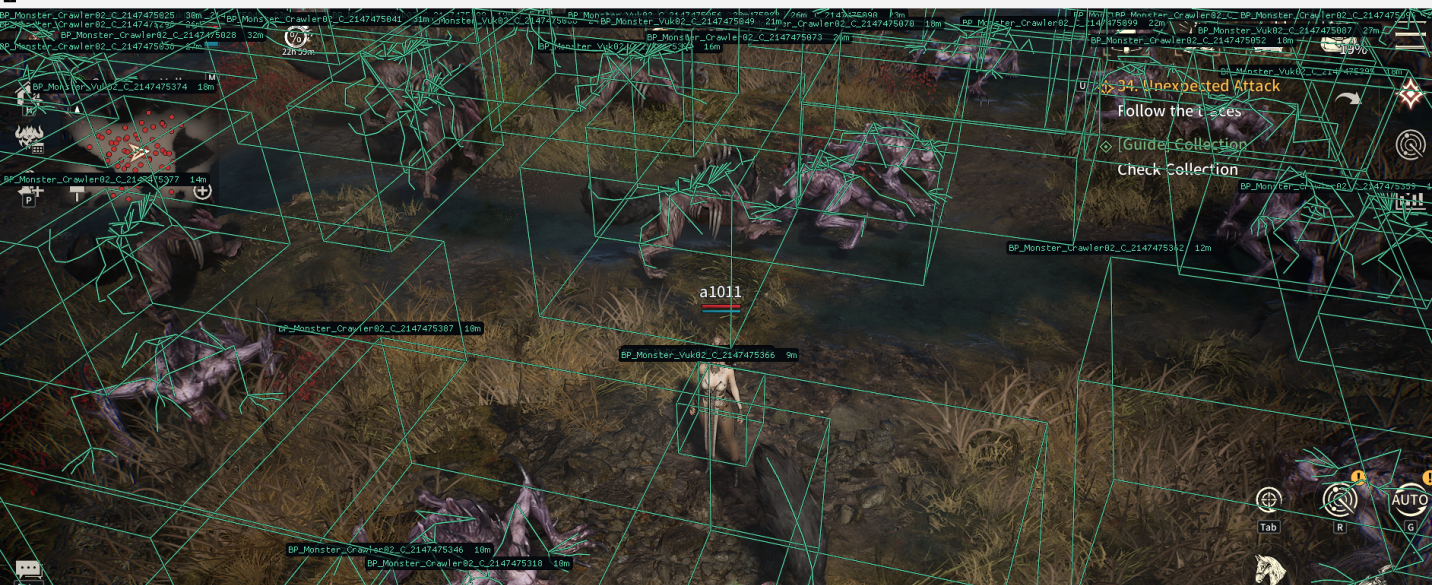 same call path that was returning zero five minutes earlier.
making it not kill the framerate
four engine calls per bone per frame is not a budget. two of them never change though. bone names and parent indices are fixed for a given mesh asset, so i build that table once and cache it on the asset pointer.
building a 205 bone table is 410 ProcessEvent calls which is way too much
for one frame, so the build is resumable. it runs with a 3 ms deadline and
returns nullptr until it is done, picking up next frame where it stopped.
if a parent index points at or after its own child the table is wrong for that
skeleton, so the asset gets marked rejected and never retried.
that leaves one GetBoneTransform per bone per frame, capped at 4096 bones
total, only for actors in front of the camera.
the skin changer
now the part i actually wanted from the start.
a vampir character is not one mesh. the costume pieces are separate components hanging off the root, and when you look at the class in the sdk it is already good news:
class UNnModularPartsComponent final : public USkeletalMeshComponent
it inherits USkeletalMeshComponent, so the stock setters work on it
unchanged.
UNnModularPartsComponent
  USkinnedMeshComponent  +0x520  SkeletalMesh              USkeletalMesh*
  UNnModularPartsComponent
                         +0xF69  PartsType                 EPartsType
                         +0xF70  DefaultSkeletalMeshSOPtr
                         +0xF98  SocketName                FName
                         +0xFA1  bLeaderPose               bool
                         +0xFA2  RenderHead                bool
PartsType is the slot, EPartsType in NnNetwork_structs.hpp: hair 0,
head 1, body 2, wing 3. bLeaderPose at 0xFA1 is why the pieces stay
glued to the character, they leader pose off the owner's ACHARACTER::Mesh
at 0x328 instead of animating themselves.
one thing that is missing from the dump: AActor::OwnedComponents is a TSet
and it is not a UPROPERTY, so dumper-7 has no offset for it. but
USceneComponent::AttachChildren at 0xC8 is reflected and reaches the same
components, so i walk that breadth first from the root with the queue capped
at 64.
finding the meshes
i grepped the object dump for skeletal meshes and the names do all the work:
/Game/RED/Mesh/PC/CommonF/Body/SKM_CostumeArmor_DarkMageF_Armor_103
/Game/RED/Mesh/PC/CommonF/Body/SKM_CostumeArmor_FighterF_Armor_104
/Game/RED/Mesh/PC/CommonF/Body/SKM_CostumeArmor_SwordManF_Hair_601
SKM_CostumeArmor_<Set>_<Part>_<Id>. split on the part token and the set name
falls out of the prefix plus the id. no data table lookup anywhere:
bool SplitAsset(const std::string& asset, std::string* set, std::string* part) {
  static constexpr std::string_view kParts[] = {"_Armor_", "_Hair_", "_Wing_", "_Head_"};
  if (asset.rfind("SKM_Costume", 0) != 0) return false;

  for (std::string_view token : kParts) {
    const size_t at = asset.rfind(token);
    if (at == std::string::npos) continue;
    const std::string prefix = asset.substr(0, at);
    *part = std::string(token.substr(1, token.size() - 2));
    *set = prefix.substr(prefix.rfind('_') + 1) + "_" + asset.substr(at + token.size());
    return true;
  }
  return false;
}
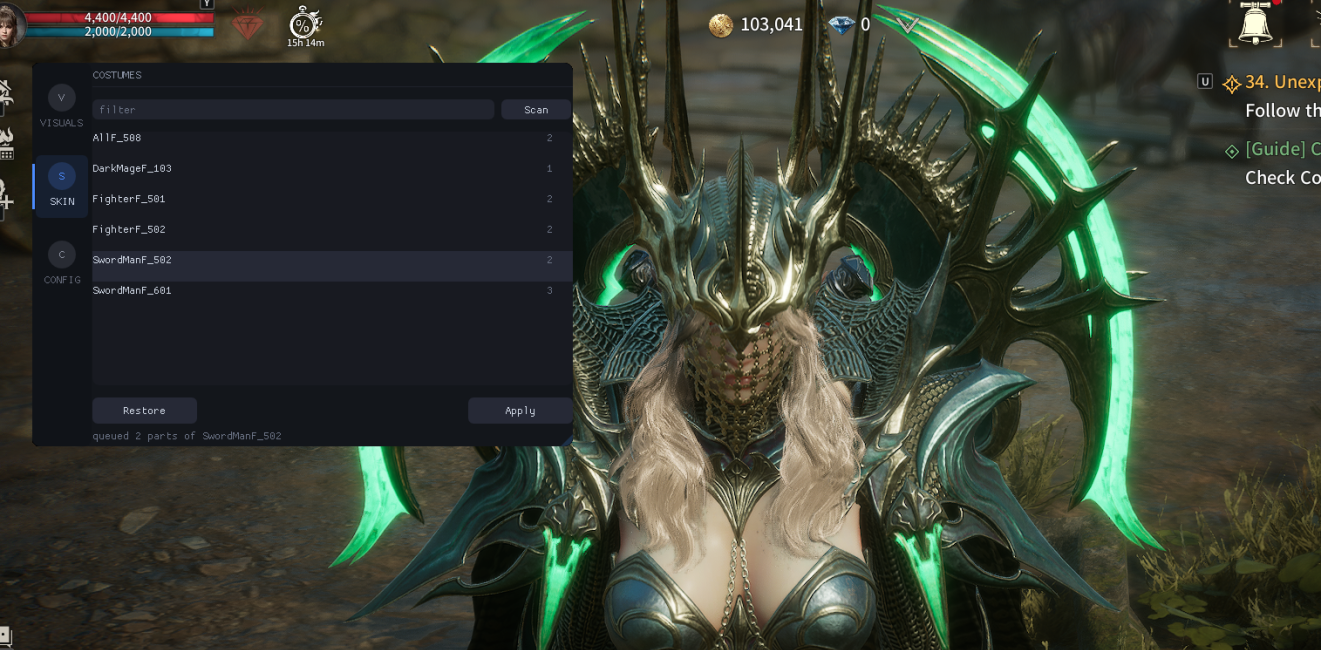 sets grouped out of a GObjects scan filtered to USkeletalMesh.
why writing the pointer is not enough
i wrote the new mesh pointer into 0x520 directly and nothing happened on
screen. the pointer changed, the character did not. the render proxy was built
from the old mesh and nobody told it to rebuild.
so it has to go through SetSkeletalMeshAsset, which is reflected, which is
why the ProcessEvent thing above had to be solved first.
the costume comes out in the wrong textures
next problem. the mesh changes and the character is wearing darkmage armour with fighter textures on it.
a skeletal mesh component does not draw with the mesh asset's materials. it draws with its own list, and that list was filled in from whatever mesh it had when it spawned. swapping the asset does not refill it.
the asset's real list is right next door:
USkeletalMesh   +0x0F0  Skeleton       USkeleton*
                +0x198  Materials      TArray<FSkeletalMaterial>

FSkeletalMaterial, stride 0x28
                +0x00   MaterialInterface    UMaterialInterface*
so after the mesh swap, one SetMaterial per element:
const auto materials =
    sdk::Read<sdk::Array<uint8_t>>(mesh, sdk::offsets::kSkeletalMeshMaterials);
if (!materials.Valid(64)) return;

for (int32_t i = 0; i < materials.count; ++i) {
  void* material = *reinterpret_cast<void* const*>(
      materials.data + static_cast<size_t>(i) * kSkeletalMaterialStride);
  if (!sdk::Live(material)) continue;
  SetMaterialParams slot;
  slot.element = i;
  slot.material = material;
  sdk::Invoke(component, set_material, &slot);
}
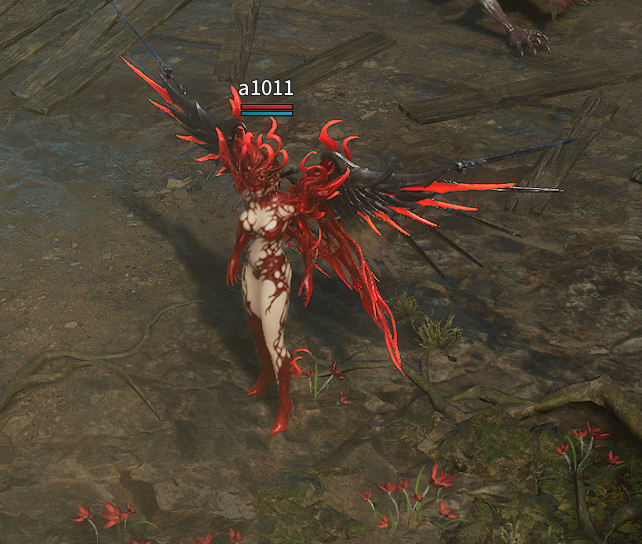
scan, pick a set, apply. hair, body and wing go into their slots together because they share the set token in the asset name. restore puts the originals back.
Skeleton at 0xF0 is the guard. if you put a part on a character with a
different skeleton it binds to bones that are not there and folds into a pile
at the origin, so i compare the two pointers first and skip if they differ.
mounts
i thought mounts would take ten minutes. they did not.
first problem, ANnVehicle has no parts components at all:
class ANnVehicle final : public AModularCharacter, public INnMeshInterface, ...
it has the same AModularCharacter base as the player, so the whole mount is
one mesh sitting in ACHARACTER::Mesh at 0x328. that part is fine, same
setter works.
second problem, finding the actor. ACHARACTER::BasedMovement at 0x340
should have it. mounted, MovementBase reads:
BasedMovement.MovementBase -> LandscapeStreamingProxy
the terrain. the player is based on the ground, not on the wolf.
GetMovementBaseActor gives the same answer. vampir does not attach the rider
to the vehicle through the engine at all, so there is no pointer to follow
from one to the other.
no amount of reading the sdk tells you this by the way. the field is right there and correctly typed, you only find out by reading it at runtime and looking at what comes back.
so the mount gets found by distance, which is ugly but it is what the data supports:
sdk::Object MountedVehicle(sdk::Object world, sdk::Object pawn) {
  const sdk::Vector pawn_loc = sdk::ActorLocation(pawn);
  double best = 500.0 * 500.0;
  sdk::Object mount = nullptr;

  sdk::ForEachActor(world, [&](sdk::Object actor) {
    if (actor == pawn) return;
    if (sdk::ClassName(actor).find("Vehicle") == std::string::npos) return;

    const sdk::Vector loc = sdk::ActorLocation(actor);
    const double dx = loc.x - pawn_loc.x;
    const double dy = loc.y - pawn_loc.y;
    const double dz = loc.z - pawn_loc.z;
    const double dist = dx * dx + dy * dy + dz * dz;
    if (dist < best) {
      best = dist;
      mount = actor;
    }
  });
  return mount;
}
nearest actor with Vehicle in its class name inside five metres. the swap
itself worked on the first try:
mount skin applied: SKM_Wolf_01 -> SKM_Cerberus03
mount skin applied: SKM_Wolf_01 -> SKM_AncientElk
mount skin applied: SKM_Wolf_01 -> SKM_Mountaingoat01
and the cerberus stood there in a t-pose.
the animbp does not follow the mesh
SetSkeletalMeshAsset does not touch AnimScriptInstance. so ABP_Wolf_C is
still running on the component, evaluating against a cerberus skeleton that
does not have the bones it is asking for, and every bone just keeps its bind
transform.
i tried SetAnimInstanceClass(nullptr) thinking the engine would pick the
right one. it does not. it runs nothing, which looks exactly the same.
the answer was sitting in the object dump. every vehicle ships its own animbp right next to its mesh:
[00167535] AnimBlueprintGeneratedClass /Game/RED/Mesh/Vehicle/Wolf/ABP/SABP_Wolf.SABP_Wolf_C
[00167551] AnimBlueprintGeneratedClass /Game/RED/Mesh/Vehicle/Wolf/ABP/ABP_Wolf.ABP_Wolf_C
[00174872] AnimBlueprintGeneratedClass /Game/RED/Mesh/Vehicle/Cerberus/ABP/ABP_Cerberus.ABP_Cerberus_C
[00174056] AnimBlueprintGeneratedClass /Game/RED/Mesh/Vehicle/Mountaingoat/ABP/ABP_Mountaingoat.ABP_Mountaingoat_C
SKM_Wolf_01 goes with ABP_Wolf_C. so the join key is the animal name:
strip SKM_, stop at the first digit or underscore.
std::string AnimalOf(const std::string& mesh_name) {
  if (mesh_name.rfind("SKM_", 0) != 0) return {};
  size_t end = 4;
  while (end < mesh_name.size() && !std::isdigit(static_cast<unsigned char>(mesh_name[end])) &&
         mesh_name[end] != '_') {
    ++end;
  }
  return mesh_name.substr(4, end - 4);
}
all fifteen vehicle meshes in the dump follow it:
SKM_Cerberus03      SKM_DarkGargoyle01  SKM_DarkGargoyle13  SKM_DarkGargoyle23
SKM_Mountaingoat01  SKM_Mountaingoat13  SKM_Mountaingoat14  SKM_Mountaingoat23
SKM_RageBoar03      SKM_RageBoar13      SKM_ThornSpider01   SKM_ThornSpider03
SKM_Wolf_01         SKM_Wolf_14         SKM_Wolf_33
mesh first, then SetAnimInstanceClass with the matched class, and it walks.
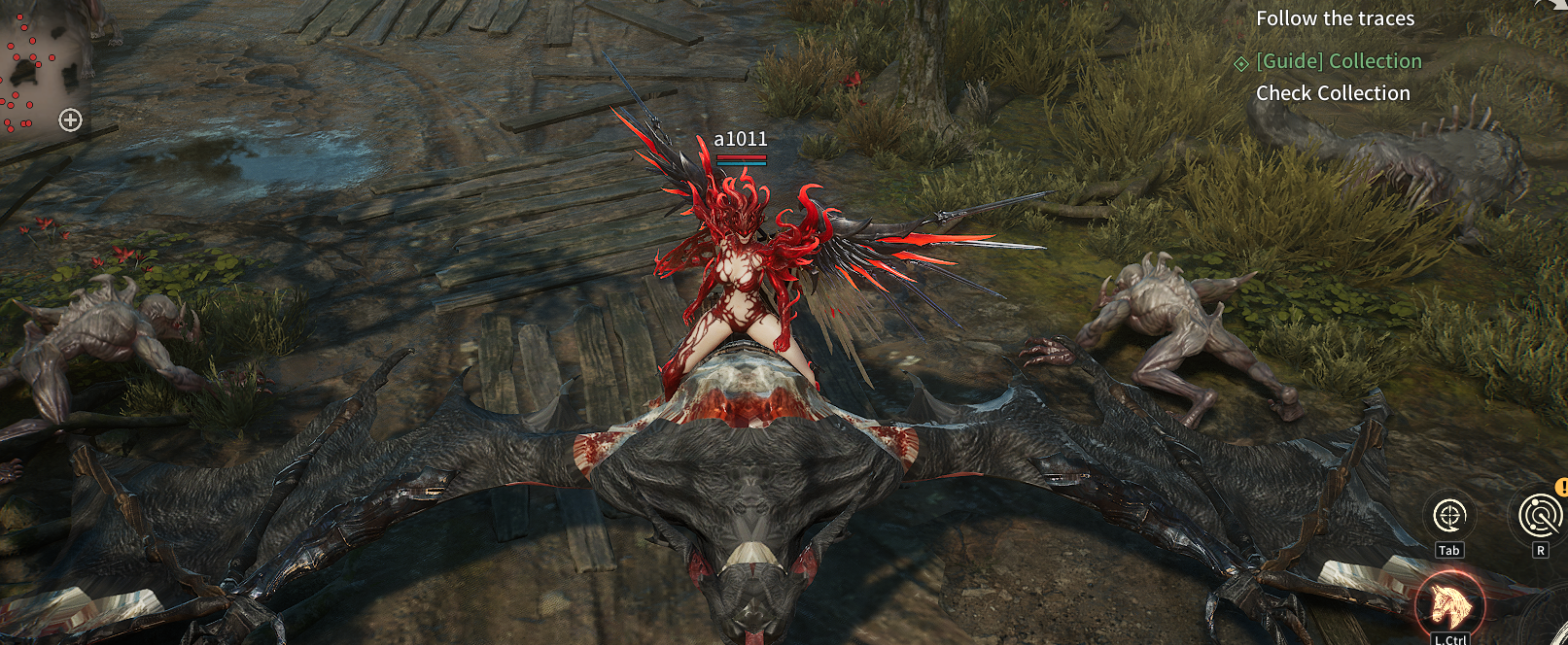 mount mesh replaced and the matching
ABP attached, so it animates instead
of t-posing. the costume on the rider is a separate set of parts component
swaps.
swapping the vehicle mesh while mounted, then riding it. without the
SetAnimInstanceClass call this clip would be a wolf shaped statue sliding
across the map.
materials get skipped across species. a wolf and a gargoyle have different slot counts so copying by index paints the wrong parts of the wrong body.
my first version of this searched
GObjectsonce per mount mesh to find the animbp. fifteen meshes against 176,300 objects, every live object costing anAppendStringcall, is 2.6 million name resolutions. the client froze for several seconds every time i pressed scan lol. now it builds a name to class map in the same pass that collects the meshes.
two things about the harness
the overlay is its own window. vampir renders with d3d12 and a correct
Present hook there has to wait on the frame fence before a command allocator
can be reset. i did not do that at first and it crashed. a layered colour
keyed window with its own d3d11 device costs one window and none of that
trouble:
WS_EX_TOPMOST | WS_EX_LAYERED | WS_EX_TRANSPARENT | WS_EX_NOACTIVATE | WS_EX_TOOLWINDOW
SetLayeredWindowAttributes(overlay, RGB(0, 0, 0), 255, LWA_COLORKEY);
black is the key colour so anything i do not draw is a hole.
WS_EX_TRANSPARENT gets cleared only while the menu is open so imgui can take
clicks. the client rect gets read every frame, which handles moving, resizing
and alt tab without any resize hook.
everything runs on my own thread. the normal advice is that ProcessEvent
needs a game thread callgate because it touches thread local script state. i
built one, a WH_GETMESSAGE hook with a job queue. then i noticed the hook was
never firing and the overlay had been calling ProcessEvent from its own
thread the entire session anyway. bone transforms, bounds, mesh swaps, all
correct.
so i deleted the bridge. 124 lines gone and one less SetWindowsHookEx for
anything to look at. i am not claiming this is safe in general, it is
in-process rather than external and the calls are short. i have not seen it
fault and i have not proven it cannot.
offsets
ProjectRED 5.5.4-0+UE5, module relative. a different build needs a new dump.
| symbol | value |
|---|---|
GObjects |
0x0B552530 |
GWorld |
0x0B6CFDB8 |
FName::AppendString |
0x015B98A0 |
UObject::ProcessEvent |
0x017E4E00 (vtable 0x4F) |
UObject::Flags / Index / Class / Name |
0x08 / 0x0C / 0x10 / 0x18 |
UStruct::Script.ArrayNum |
0x68 |
UFunction::FunctionFlags |
0xB0 |
EFunctionFlags::Native |
0x400 |
UWorld::PersistentLevel / Levels |
0x30 / 0x178 |
ULevel::Actors |
0xA0 |
AActor::Owner / RootComponent |
0x158 / 0x1B8 |
USceneComponent::AttachChildren |
0xC8 |
ACHARACTER::Mesh / Capsule / BasedMovement |
0x328 / 0x338 / 0x340 |
USkinnedMeshComponent::SkeletalMesh |
0x520 |
USkeletalMesh::Skeleton / Materials |
0xF0 / 0x198 |
ANnCharacter::CombatState |
0xEA9 |
UNnModularPartsComponent::PartsType |
0xF69 |
APlayerController::AcknowledgedPawn |
0x350 |
APlayerCameraManager::CameraCachePrivate |
0x1410 (POV at +0x10) |
end
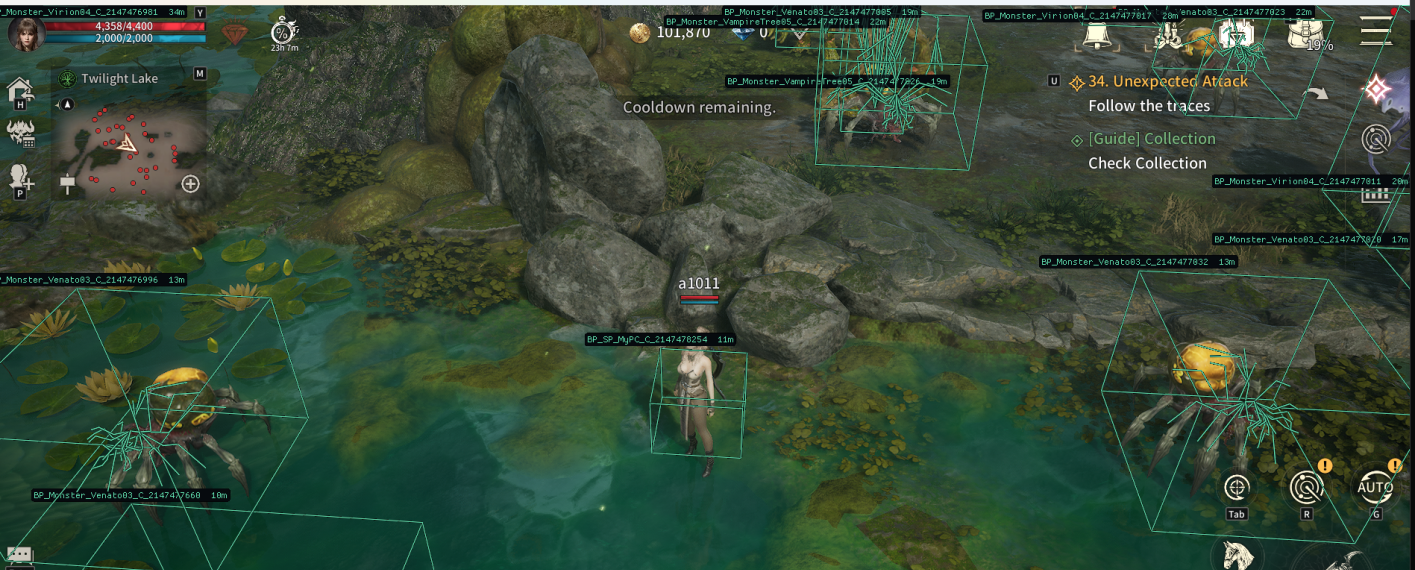
about 2,500 lines total and almost every offset in that table came out of a header a tool generated for me, not out of a disassembler. that is what unreal gives you and it is a lot.
the two things that actually cost time were not offsets. one was a dispatch
flag four instructions into a function i never thought to read, which made
every call return zero and report success. the other was BasedMovement
pointing at the terrain, which no amount of reading headers would have told me
because the field looks completely normal.
two things i never worked out. UNnModularPartsComponent::SocketName at
0xF98 suggests parts can attach to arbitrary sockets instead of only leader
posing off the body, and i never tested writing it. and
ANnCharacter::SkinType at 0xEA1 is a one byte enum sitting right next to
ObjType at 0xEA0 that i could not identify. if it picks a material variant
it is a much cheaper lever than everything above.
the lesson i keep relearning: when a function returns nothing and does not crash, stop checking your own code and go read the function. the sdk had the answer in two lines and the binary had it in one instruction, and i spent a week on neither.